Features
Everything it does, in the order you would use it
Grouped by the part of the day it belongs to rather than by which screen it lives on, because nobody has ever gone looking for “the records module”.
Quoting
The bit that wins work, done before you leave.
- Line items with quantity, unit price and per-line tax
- Your usual materials and rates saved, so a quote is taps not typing
- Photos attached to the job, from the camera, on site
- A customer link that works without an account or a login
- One-tap acceptance, recorded with a timestamp
- Quote converts to an invoice without re-entering anything
Jobs and scheduling
Everyone knows where they are going.
- A shared schedule the whole account can see
- Status on every job: quoted, scheduled, on the tools, done
- Job notes and photos that stay with the job, not in a phone gallery
- Hours logged against the job by whoever did them
- Client history, so you can see what you did there last time
- Site addresses separate from billing addresses, for property managers
Invoicing and getting paid
Money in, sooner, with less chasing.
- Invoice from a finished job in two taps
- Sequential numbering with no gaps, as tax authorities require
- Part payments, with the outstanding balance tracked
- Automatic reminders on overdue invoices
- Card payment from the invoice link
- Credit notes, because a finalised invoice should never be edited
Working offline
The feature you only notice when everything else fails.
- Create and edit quotes, jobs, clients and invoices with no signal
- Photos and notes captured offline and uploaded later
- A visible queue, so you always know what has not sent yet
- Sends itself the moment you are back in range
- Duplicate-proof: the same change sent twice is applied once
- Install to your home screen and open it like any other app
Tax and money
Correct in your country, in your currency.
- GST, HST and US sales tax, at rates you set
- Several rates on one document, per line
- Tax-inclusive or tax-exclusive pricing, whichever your market expects
- Your tax number on every document, where it is required
- Prices in AUD, USD, CAD or NZD
Your crew
Up to ten people on one flat price.
- Roles: owner, office, and on the tools
- Each person signs in as themselves — no shared password
- Add and remove people yourself, no support ticket
- One language setting for the whole business
- English, Spanish and Russian, including on customer documents
- Removing someone never deletes the work they did
Your data
Yours, and easy to take with you.
- Export invoices and payments for your accountant
- Every business’s data isolated at the database level, not by a filter in the code
- Finalised documents cannot be silently edited
- Webhooks, so your own systems can react to what happens
- A read API with scoped keys, on the Crew plan
- No contract, no notice period, cancel from the app
The difference
The parts other software does not do this way
Every product in this category has quoting and invoicing. These are the decisions that make this one different to live with.
It works with no signal at all
Not "you can look at your schedule offline". You can write a quote, add photos, log hours and finish a job in a basement with no bars, and it all queues on the phone and syncs itself when you come back up. Sending the same job twice still only creates one job, so a flaky connection never doubles your paperwork.
Every change is stamped with an id generated on your phone. The server accepts each id once and once only.
One price for the whole crew
Ten people are included in the Crew plan. Not ten seats you buy, ten people. Most job management software charges per user, which means the software gets more expensive at exactly the moment you take someone on — the moment you can least afford it and can least afford to be thinking about software.
Hiring your third person changes nothing about your bill.
A free plan, not a countdown
Five invoices a month, one person, every feature. It does not expire, and nothing is held back to make you upgrade. If you do a job a week it may be all you ever need, and we would rather have you on the free plan telling people about us than gone in fourteen days.
No credit card is asked for at any point on the free plan.
English, Spanish and Russian
Set the language once for the business and it changes every screen for everybody on the account — and the quotes and invoices your customers receive, not only the buttons your crew press. A crew whose office manager works in English and whose apprentice reads Spanish is a normal crew, and software should not make that awkward.
One setting for the account. Customer documents follow it too.
Your tax, correct, in your money
GST at 10 or 15 per cent, US state and county sales tax, Canadian GST, HST and the provincial taxes on top. Several rates on one invoice. Invoice numbers that run in sequence with no gaps, which most tax authorities require and a surprising amount of software gets wrong.
Set it once when you sign up. Every document totals correctly after that.
It runs on the phone you already own
There is nothing to install from an app store. Open it in the browser, add it to your home screen, and it behaves like an app — on any phone, any tablet, and the same account on a computer in the evening. No "sorry, that feature is iPhone only".
One codebase, three layouts: phone, tablet, desktop.
Your data stays yours
Export everything, whenever you like, in a format your accountant can open. No contract, no notice period, no exit fee, and no phone call required to cancel. Software that is hard to leave is software that has stopped trying to be worth staying for.
Export is a button, not a support ticket.
On the phone, the tablet and the computer
One account, three layouts. Not a phone app with a stretched version for big screens — the desktop gets proper tables and a sidebar, because that is what a screen that size is good at.
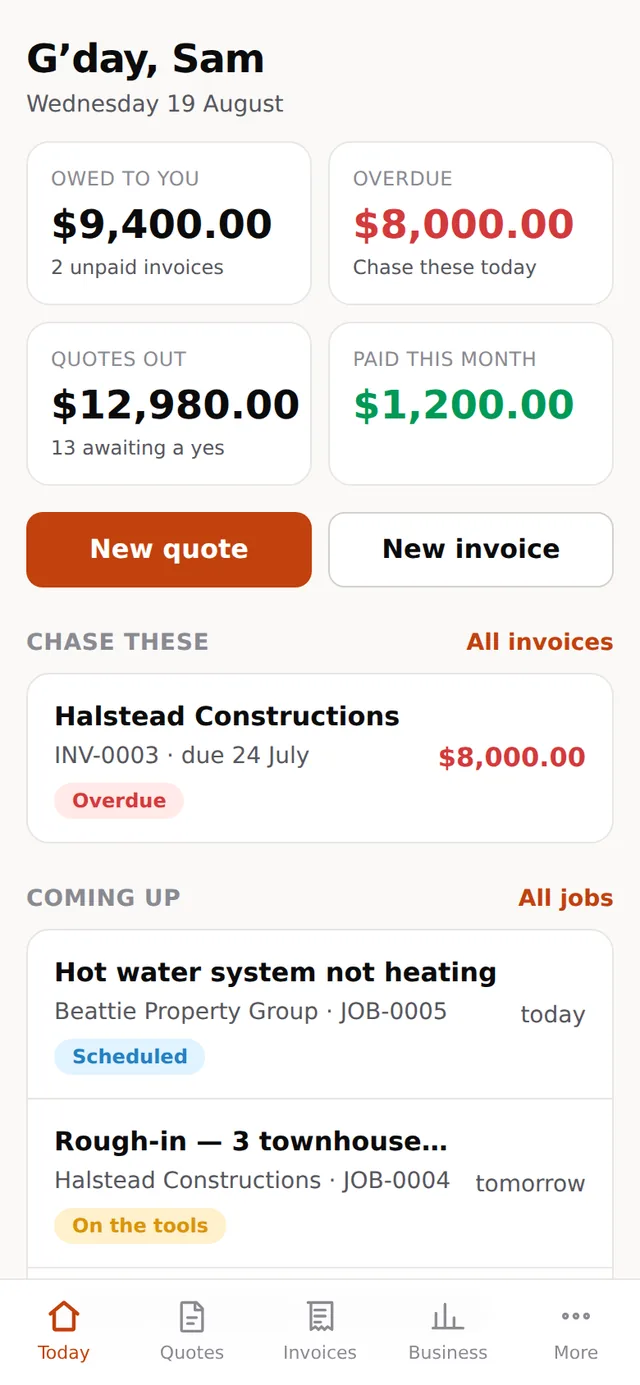
The whole business, one thumb
The screen that matters, because it is the one you use standing in somebody’s kitchen. Big targets, no menus to hunt through, and every screen usable with one hand while the other holds a torch.
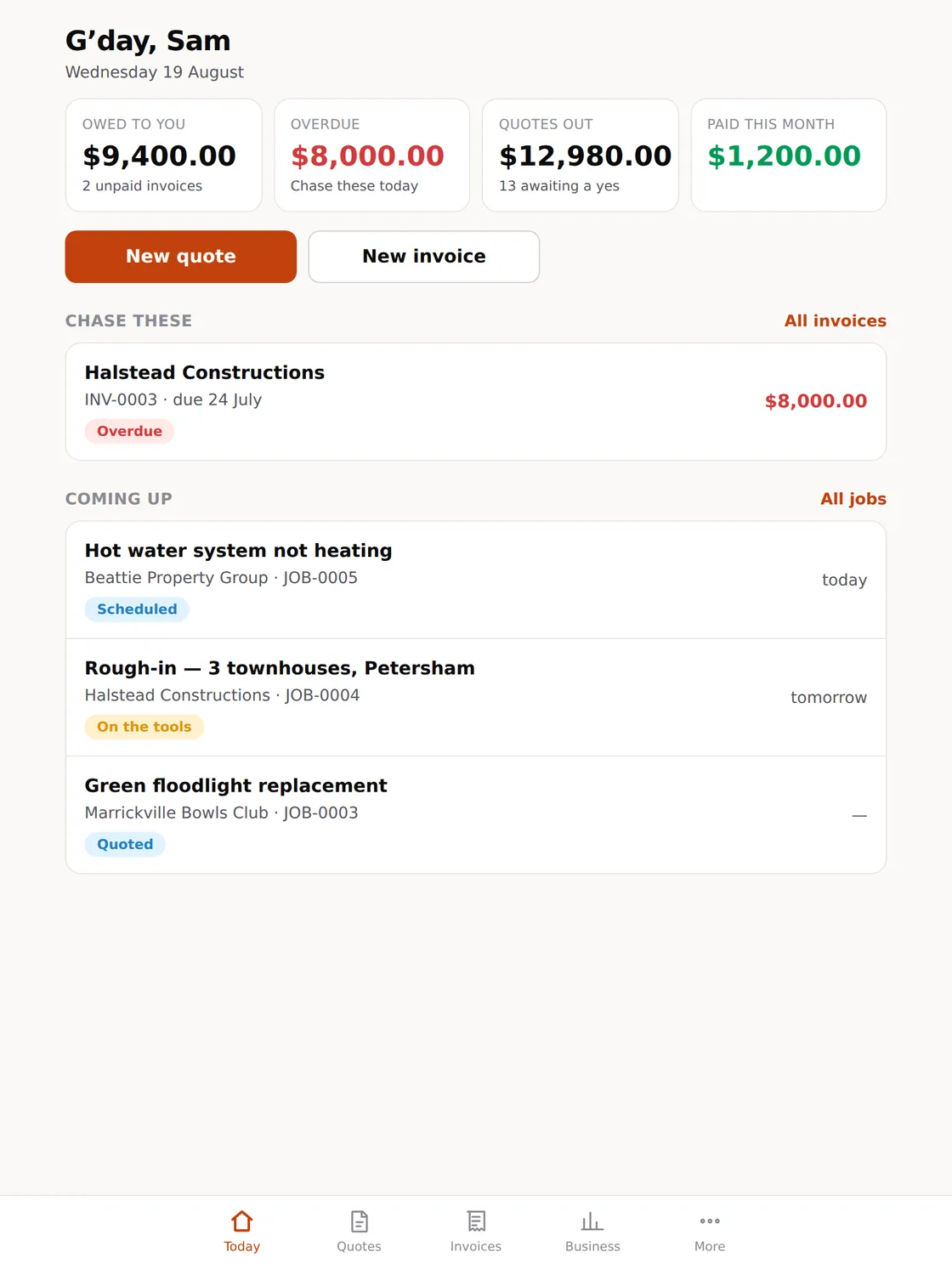
For the van, and the kitchen table
More on screen without becoming a spreadsheet. The size most people quote from when they are sitting down with a customer, and the size an office iPad ends up living at.
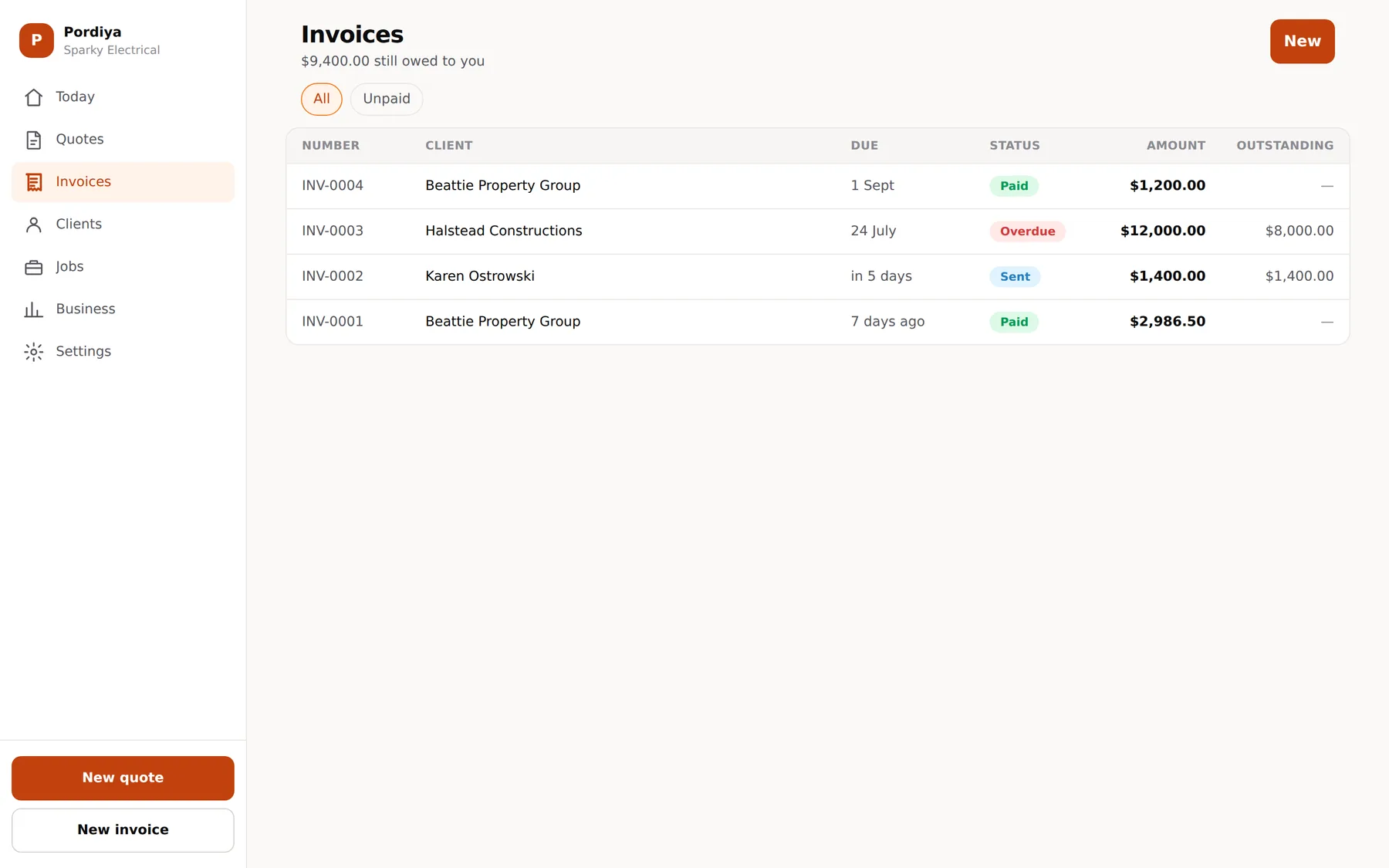
For the evening, and the end of the month
The same account, with room for the dense tables — every invoice, what is outstanding, who has not paid. Sidebar navigation instead of a tab bar, and columns you can actually scan.
Get started
Knock off the paperwork,
not your evenings.
Free to start, no credit card. Run your next job through it and see the difference.
- No credit card
- Works offline
- Set up in 10 minutes