Job management for trades, anywhere
Run the whole job
from your phone.
Quote on site. Book the crew. Track the job. Invoice before you leave the driveway. Pordiya puts your entire business in one app, so your evenings are yours again.
- No credit card
- Works offline
- Set up in 10 minutes
2 changes queued — will send when you have signal
On every screen you own
Phone on site. Tablet in the van. Computer at the kitchen table.
One account, three layouts — not a phone app stretched to fill a monitor. The desktop gets proper tables and a sidebar because that is what a big screen is good at, and the phone gets big targets because you are using it one-handed.
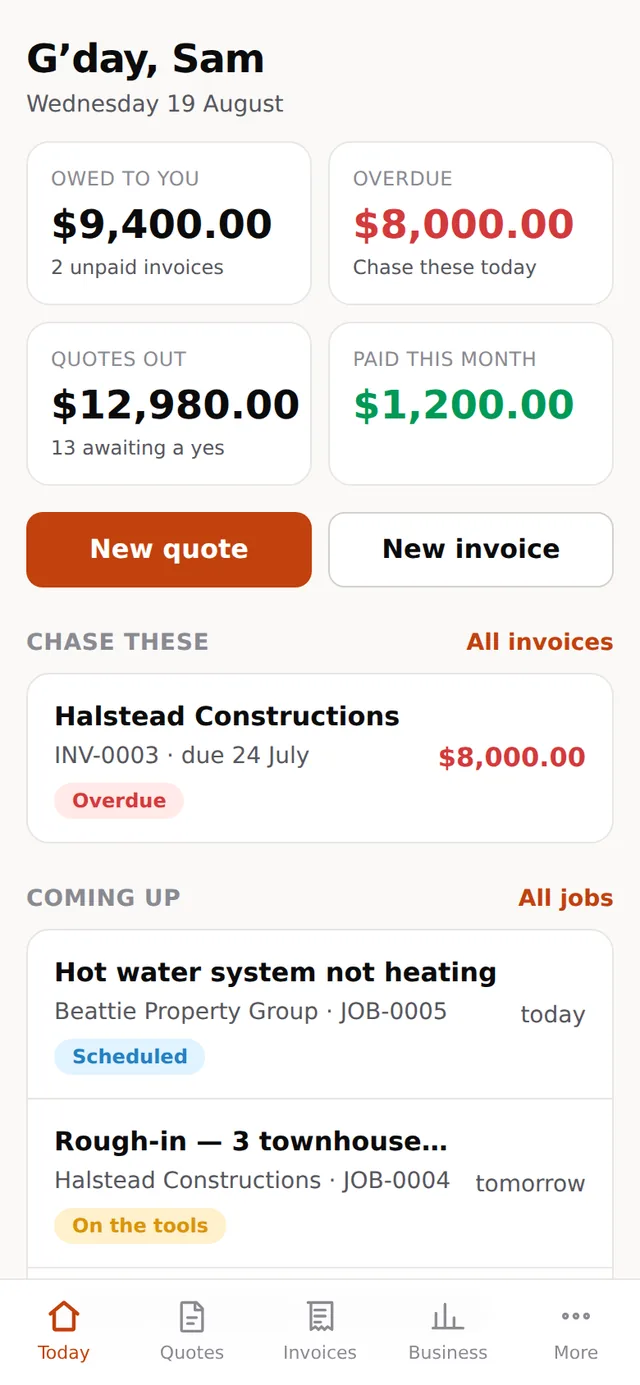
The whole business, one thumb
The screen that matters, because it is the one you use standing in somebody’s kitchen. Big targets, no menus to hunt through, and every screen usable with one hand while the other holds a torch.
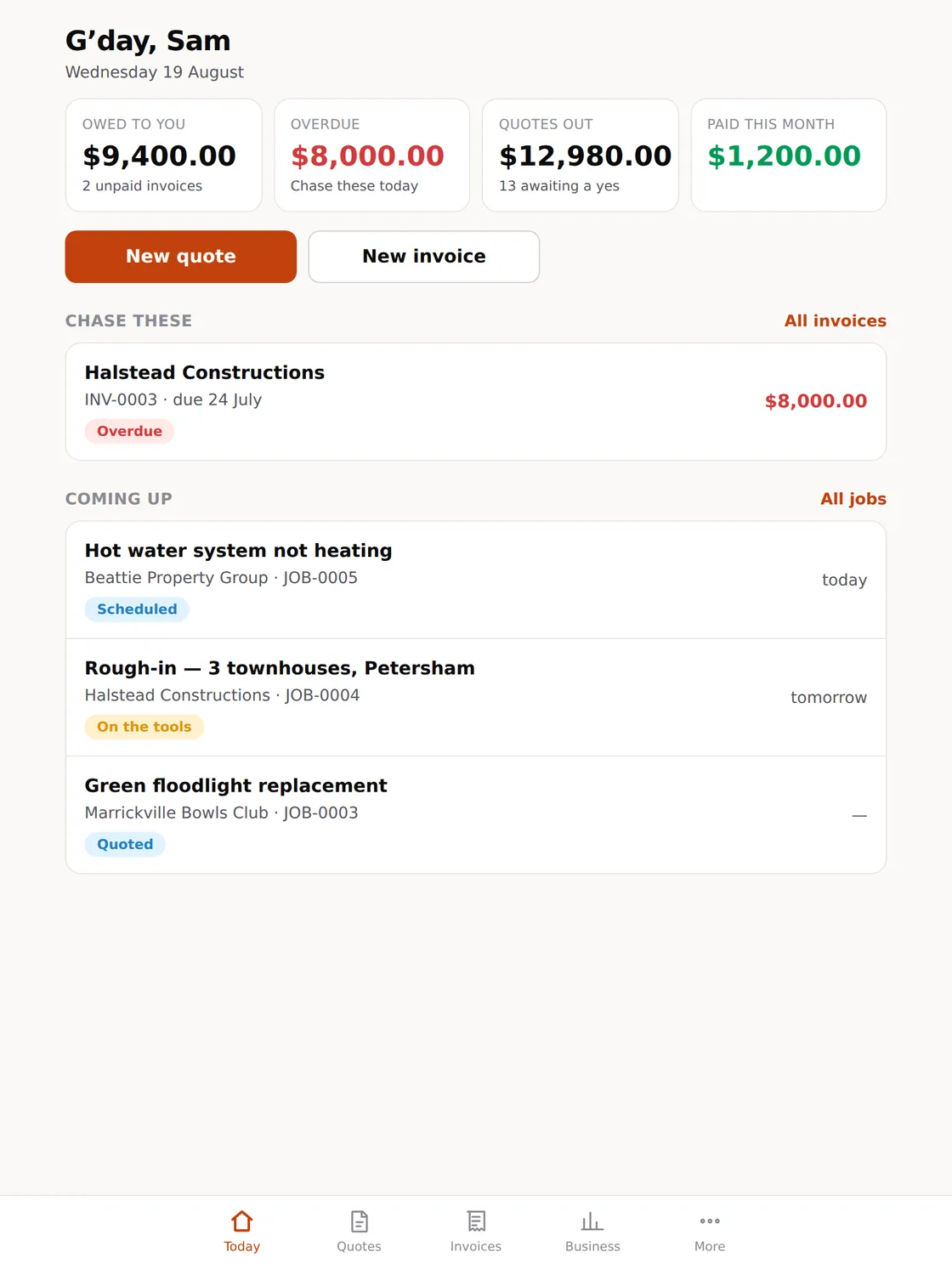
For the van, and the kitchen table
More on screen without becoming a spreadsheet. The size most people quote from when they are sitting down with a customer, and the size an office iPad ends up living at.
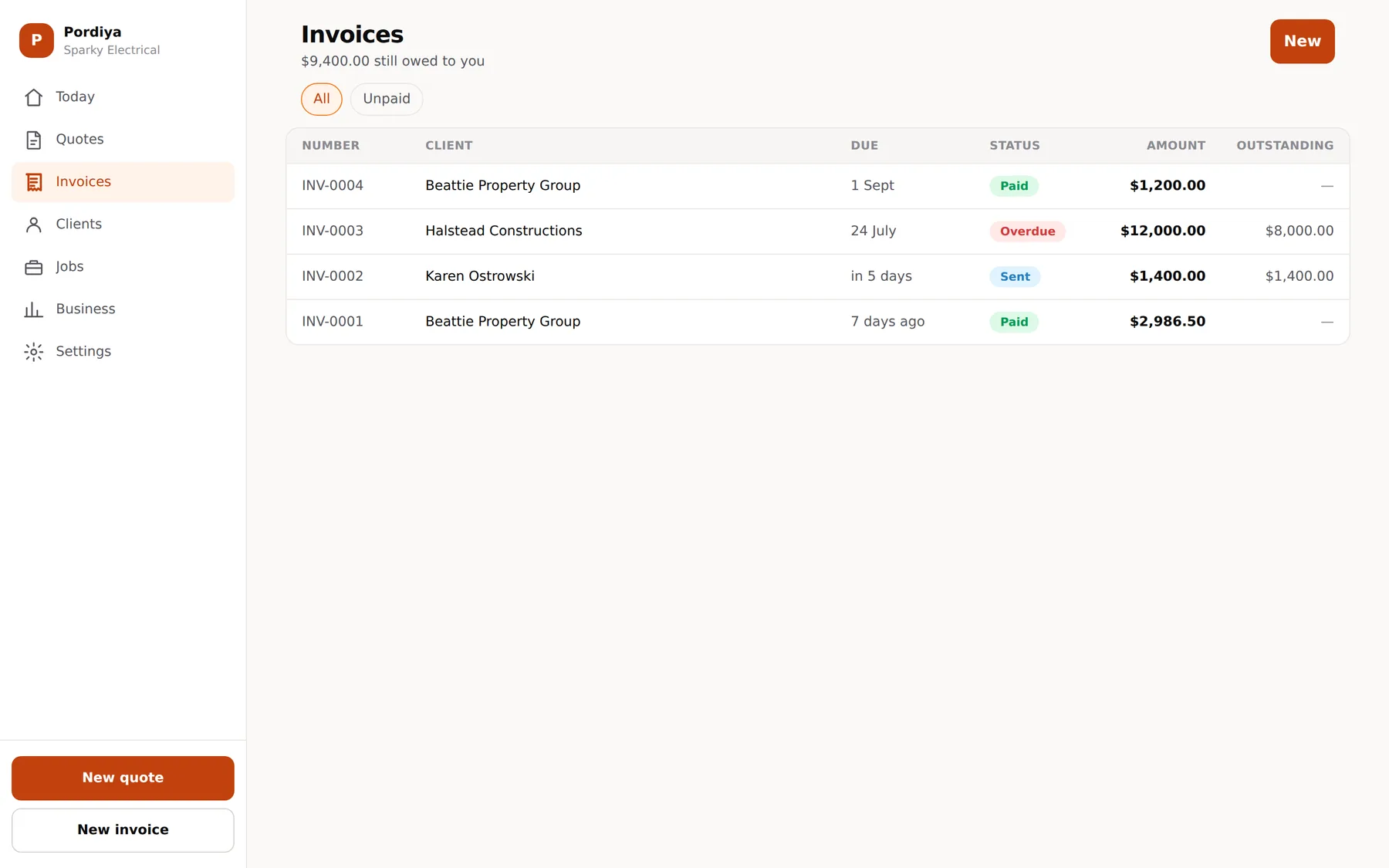
For the evening, and the end of the month
The same account, with room for the dense tables — every invoice, what is outstanding, who has not paid. Sidebar navigation instead of a tab bar, and columns you can actually scan.
Every screenshot on this site is the real app. Nothing here is a drawing.
The real cost of paperwork
You did not get your licence
to do data entry.
Quotes written on the tailgate. Invoices done at nine at night. Chasing the same customer three times for money you have already earned. It is the part of the job nobody warned you about, and it costs more than you think.
59%
Of small businesses are carrying invoices more than 30 days overdue, up from 47% a year earlier.
Intuit QuickBooks Small Business Late Payments Report, 2026
$17.7k
Average amount a small business is owed in overdue invoices at any one time. That is your money, in someone else’s account.
Intuit QuickBooks Small Business Late Payments Report, 2026
24 days
A year lost to financial admin at the average small business. Nearly a month of working days, spent on paperwork.
Sage, The Hidden Admin Burden on Small Businesses, 2025
Everything in one place
One app. The whole business.
No more juggling a notes app, a calendar, a spreadsheet and a folder of receipts. This handles the job from first call to last payment.
Quote on site, win it on site
Build a professional quote on your phone before you leave the driveway, with your rates and materials already loaded. Customers accept with one tap. No printing, no email tennis.
Works with no signal at all
Basements, roof cavities, rural sites, underground car parks. Quotes, notes, photos and hours save to the phone and sync themselves the moment you have reception again. Nothing is lost and nothing is entered twice.
Scheduling that fits real days
Move jobs around a calendar the whole crew can see. Everyone knows where they are going and what is next, without twenty messages at six in the morning.
Invoice on the spot, get paid sooner
Turn a finished job into an invoice in two taps and send it before the tools are packed. Customers pay from the link. Reminders chase the slow ones so you do not have to make that call.
Your country’s tax, already correct
GST, HST, state sales tax, multiple rates on one invoice. Set your rates once and every document totals correctly, in your currency, with the numbering your tax office expects.
Know if you are actually making money
What is quoted, what is booked, what is owed, at a glance. Job level margins show which work is worth chasing and which customers are not.
How it works
Up and running before lunch.
No consultants. No two week onboarding. No manual.
-
01
Add your business
Your logo, your hourly rate, your usual materials, your tax rates. Ten minutes with a coffee and you are set up properly.
-
02
Run your next job through it
Quote it, book it, do it, invoice it. One job is all it takes to see where the hours were going.
-
03
Get your evenings back
The paperwork is done by the time you get home, because you did it on site without thinking about it.
What changes
Less time on the laptop.
More money in the account.
This is not software you have to learn. It is the way you already work, without the paperwork falling through the cracks.
-
Quotes go out the same day
The job you quote today is the job you win this week. A fast quote beats a good quote that arrives on Friday.
-
Money lands sooner
Invoice on site, let the reminders do the chasing, and stop waiting sixty days on work you finished in an hour.
-
Nothing gets forgotten
No missed jobs, no unsent invoices, no wondering whether that one ever got billed. Every job has a status you can see.
-
You look like the bigger outfit
Clean branded quotes and invoices, confirmations that arrive on time. Customers back the business that seems organised.
-
Your accountant stops calling
Records, photos and receipts sit against the job, ready at filing time instead of buried in the van.
Who it is for
Sole traders and small crews.
One person with a van or a team of eight. Built for the businesses too busy for enterprise software and too serious for a notepad. The big platforms charge per user and bury you in features you will never open. This one does neither.
Pricing
Free to start. One flat price for the crew.
No per-user charge, no job limits, no annual contract. Prices are set locally in each currency rather than converted at the till.
Free
US$0 forever
1 person
For the first few jobs, and for as long as you want.
- 5 invoices a month
- Unlimited quotes, clients and jobs
- Works with no signal
- Your currency and tax rates
- Customer-facing quote and invoice links
- No credit card, no time limit
Not a trial. It does not expire and it is not a cut-down version — every feature below is in it.
Solo
US$29 /month
Up to 2 people
For one or two people, doing the work and the paperwork.
- Everything in Free
- Unlimited invoices
- Automatic payment reminders
- Card payment on the invoice
- Your logo on every document
- Export to your accountant
Most crews
Crew
US$79 /month
Up to 10 people
For a small team. One price, however many of you there are.
- Everything in Solo
- Up to ten people at no extra cost
- Roles: owner, office, on the tools
- Shared schedule the whole crew sees
- Webhooks and API access
- Priority support
Hiring your third person does not change your bill. That is the whole point of this tier.
Every price, in every currency
| Currency | Free | Solo | Crew |
|---|---|---|---|
| USD United States | Free | US$29/mo | US$79/mo |
| AUD Australia | Free | A$45/mo | A$119/mo |
| CAD Canada | Free | C$45/mo | C$119/mo |
| NZD New Zealand | Free | NZ$29/mo | NZ$79/mo |
You are billed in the currency of the country your business is in. These are the real prices, not a conversion applied at checkout — so the number on your statement is the number here.
The maths
What a crew of five costs, a month
Most job management software is priced per user, so the bill goes up the day you take somebody on. Same five people, each product’s entry plan, monthly billing.
From each company’s own pricing page, checked August 2026. ServiceM8 is left off this chart because it is priced by jobs per month rather than by people, which does not compare honestly on one axis.
Questions
Fair enough. Here are the answers.
How long does it take to set up?
About ten minutes. Add your business details, your hourly rate, your tax rates and the materials you use most, and you can quote your next job straight away. There is nothing to install on a computer and no training required.
Do I need to be good with technology?
No. If you can use your phone’s camera and send a text message, you can use this. It is built around how a job actually runs, not around menus and settings.
Can I add my apprentice and the rest of the crew?
Yes, and it does not cost extra. Up to ten people are included in the one flat price. Most job management software charges per user and gets expensive at exactly the moment you hire someone, which we think is the wrong way round.
Does it really work with no reception?
Yes, and this is the part most competitors get wrong. The app keeps working with no signal at all: you can write a quote, add photos and log hours in a basement. Everything queues on the phone and syncs when you are back in range, and a job that syncs twice is still only one job.
Which countries does it work in?
Australia, New Zealand, the United States and Canada. Set your currency and your tax rates and the documents come out correct, whether that is GST, HST or state sales tax. Invoice numbering follows the sequential, no gaps rule that most tax authorities require. We are not in the UK or Europe yet.
What does the free plan actually include?
5 invoices a month, one user, and every feature above. It is not a crippled demo. If you are doing about a job a week it may be all you ever need.
What happens to my accounting?
Invoices and payments export cleanly, so your bookkeeper gets proper records and you are not typing the same numbers into two systems at filing time.
What if it is not for me?
Then you walk away. No credit card to start, no contract, cancel any month. Your data stays yours and you can export it whenever you like.
Get started
Knock off the paperwork,
not your evenings.
Free to start, no credit card. Run your next job through it and see the difference.
- No credit card
- Works offline
- Set up in 10 minutes